How do I handle gift certificates?
When a client redeems a gift certificate, open their appointment, tap the price, and mark it as a gift certificate. Solo sets the price to $0 for you. Before you do, decide how you want those visits to count toward your revenue.
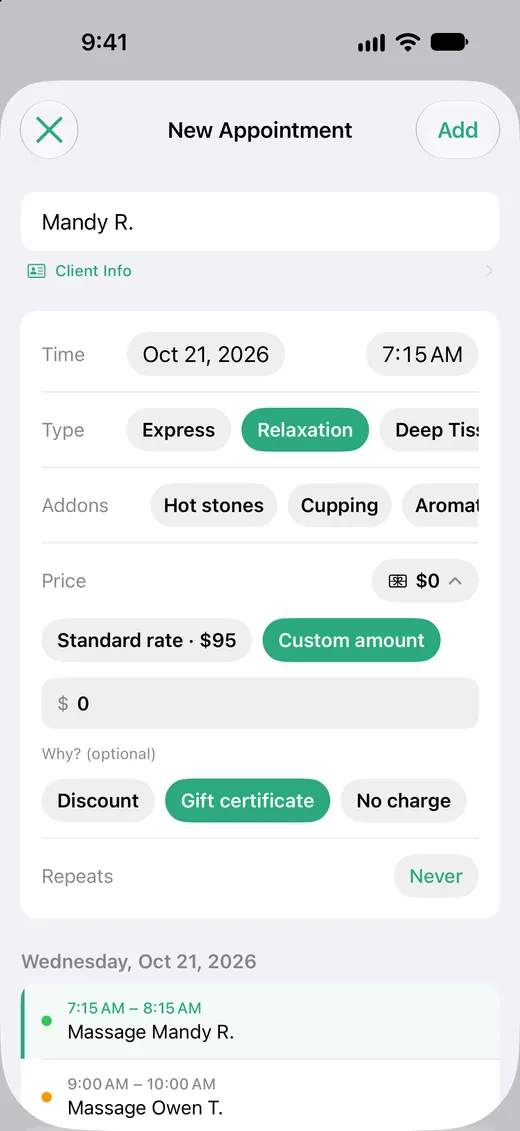
Redeem a gift certificate
- 1 Open the appointment.
- 2 Tap the price next to Price, then tap Custom amount.
- 3 Under Why?, tap Gift certificate. Solo fills in $0.
- 4 If the certificate covers only part of the visit, change the amount to what the client is paying on top. A $50 certificate on a $95 massage leaves $45.
- 5 Tap Save.
The appointment shows a small gift card next to its price in This Week and in the client's history.
Decide how gift certificate visits count
Solo tracks appointments, not payments, so it never sees the day you sold the certificate. That leaves a choice about the day it's used:
Leave it at $0
The visit counts as $0 in your revenue. This matches the money that came in that week. Pick this if you track certificate sales somewhere else, like your bookkeeping, so the money isn't counted twice. Your Solo revenue will run a little below your bank deposits by the amount of certificates you've sold.
Enter the certificate's value
Change the amount from $0 to what the certificate is worth and keep Gift certificate selected. The visit counts at full value on the day you did the work, so your revenue shows what your time earned. Your Solo revenue will run ahead of your bank deposits in the months certificates are redeemed, and behind in the months they're sold.
Whichever you choose, use it every time. Mixing the two makes month-to-month comparisons hard to read.
Free visits
For a visit you're not charging for at all, like a make-good or a visit for a friend, choose No charge instead. It also sets the price to $0, and the visit shows a heart next to its price, so you can tell it apart from a certificate later.
What you'll see in your calendar
The price and the reason are written into the event notes, so the visit stays marked even if it's edited from another device.
Core: 60m
Price: $0 (Gift certificate)
Leave these lines as they are. Anything else you write in the notes is kept.
How it affects your totals
Whatever amount you enter is what the visit counts as everywhere: the week's total in This Week, the month in Calendar, every chart in Insights, the client's total, and the Home Screen widgets.
Gift certificate visits still count as visits. They're included in your session counts, your active clients, and the client's history.