Book in seconds
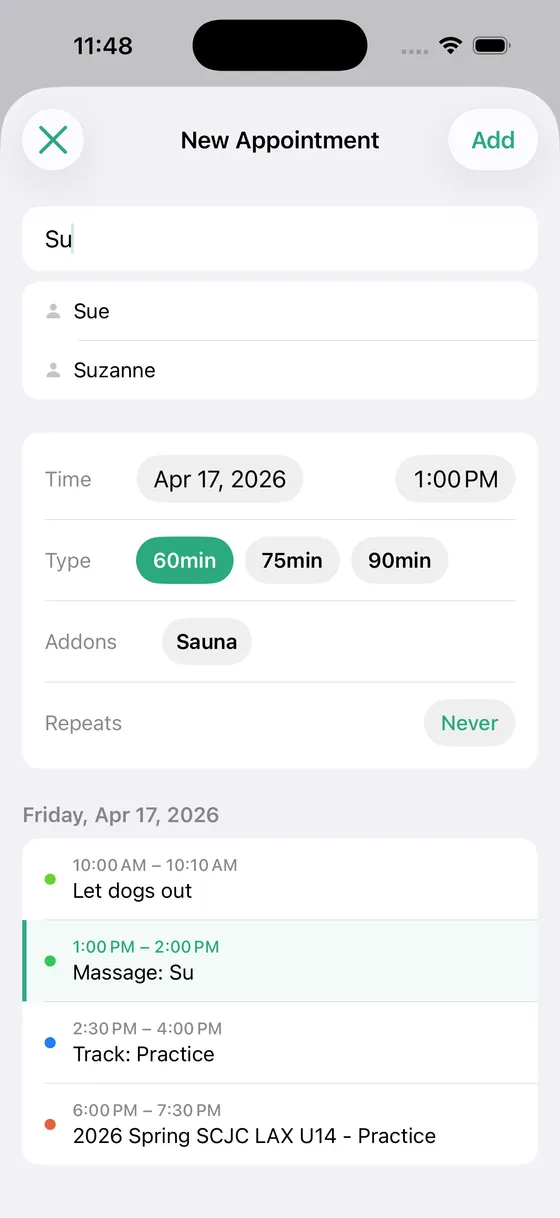
You are usually booking the next appointment while the current client is putting their shoes on. Solo makes that a few taps, not a form.
Your services, your durations, your prices
Set up the services you actually offer with their lengths and prices, such as 60, 75, and 90 minutes, or Cut, Cut & Color, and Color & Style. Add the extras you sell on top, like hot stones or a 20-minute sauna, with their own price and optional timed options.
When you raise your rates, set the new starting rates from a date. Appointments booked before that keep the price they were booked at, so your history stays honest.
Booking a client
Start typing a name and Solo suggests the clients you already have. Pick the service, any add-ons, and the time. The price fills in from your rates. The day's other events sit right below the form so you can see the open gap you are booking into.
Standing appointments
For the client who comes every Tuesday at 9, set the appointment to repeat weekly or every two weeks. When plans change, edit or cancel just that one visit or that one and everything after it.
Custom prices, with a reason
A first-visit discount, a gift session, a no-show fee: enter a custom amount and an optional note about why. Your revenue numbers stay accurate and you remember what happened when you look back.
Today, on your Home Screen
A Today widget lists today's appointments without opening the app. Glance at your phone between clients and know who is next.
The details
- ✓ Core services with durations and prices, plus priced add-ons
- ✓ Client name suggestions as you type
- ✓ Repeat weekly or every two weeks; edit this visit or this and future visits
- ✓ Custom price with an optional reason per appointment
- ✓ Starting rates with effective dates, so old appointments keep old prices
- ✓ Today widget for the Home Screen
Who uses this
Solo is built for people who schedule their own clients.
Questions
- Can clients book themselves online?
- No. Solo is your appointment book, not a public booking page. If you need clients to book from a link, Square Appointments, Acuity, and Booksy do that, and they charge accordingly.
- Does Solo send text or email reminders to clients?
- No. Solo doesn't contact your clients. Many independent pros text a reminder themselves the night before, and your phone already does that well.
- Can I schedule for more than one practitioner?
- No. Solo is built for one person. When you hire, you have outgrown it, and we mean that as a compliment.
- How do I handle a no-show?
- Keep the appointment and set a custom price for what you charged, with a note like “no-show fee”, or delete it. Either way your numbers reflect what actually happened.
Simple pricing
Start free. Upgrade when you're ready.
Free
Up to 3 clients
- ✓ Calendar sync
- ✓ Appointment scheduling
- ✓ Current year insights
Solo Pro
per month
- ✓ Unlimited clients
- ✓ Full historical insights
- ✓ Cash flow forecasting
- ✓ Revenue trends
Solo Pro
per year (2 months free)
- ✓ Everything in monthly
- ✓ Best value
Ready to simplify your schedule?
Download Solo Scheduling and get set up in under two minutes.
Download for iOS