Your family sees when you're busy. You see when they are.
Most scheduling apps know about your clients and nothing else. Solo was built for people whose work day and family day share the same hours.
The double-booking problem
You say yes to a 4:00 client while you are between appointments. At 3:50 your partner texts to ask if you are on your way to the 4:15 pickup that has been on the family calendar for two weeks. Now someone is getting a very apologetic call.
The fix isn't another calendar. It's seeing the one you already share with your family at the moment you are deciding whether to book.
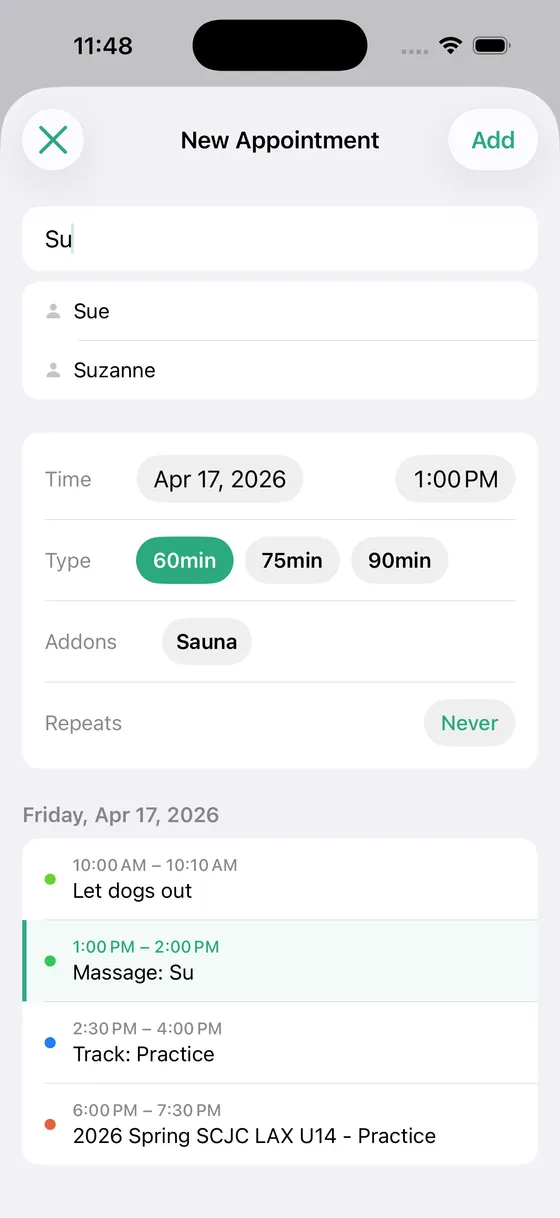
See their calendar before you book
When you schedule in Solo, the events from your family's shared calendars appear below the appointment form for that day. If the dentist is at 4:15, it is sitting right there before you tap Add. You pick which calendars show up, so you can include the family calendar and leave out the one that tracks the neighborhood recycling schedule.
They see your appointments
Because every appointment is a real calendar event, you decide who sees it with the calendar sharing you already have. Put appointments in a calendar you share with your partner and they see your day on their own phone, in the Calendar app they already use. Keep appointments in a private calendar and share a separate one for family plans if you would rather keep client details to yourself.
No app for them to install
Your family doesn't need Solo. They don't need an account. They keep using the Calendar app on their phone, and it keeps being right.
The details
- ✓ Family and personal calendars shown alongside the appointment you are booking
- ✓ Choose which calendars to show in Settings
- ✓ Appointments shared through normal iCloud or Google calendar sharing
- ✓ Works for partners, co-parents, and anyone else you share a calendar with
- ✓ Nothing for family members to install
Who uses this
Solo is built for people who schedule their own clients.
Questions
- Do my family members need Solo Scheduling?
- No. They use the Calendar app they already have. Solo reads the calendars they share with you and writes your appointments into a calendar you can share with them.
- Can I keep client names private from my family?
- Yes. Keep appointments in a calendar you don't share, and share a separate calendar for family plans. Solo still shows the family calendar to you while you book.
- Does this work with Google family calendars?
- Yes. Any calendar that appears in your iPhone's Calendar app can be shown in Solo, including Google calendars shared with you.
- Will Solo stop me from booking over a family event?
- It shows you the conflict so you can decide. Some conflicts are fine, like a client during a kid's practice you aren't driving to. Solo doesn't guess which ones.
Simple pricing
Start free. Upgrade when you're ready.
Free
Up to 3 clients
- ✓ Calendar sync
- ✓ Appointment scheduling
- ✓ Current year insights
Solo Pro
per month
- ✓ Unlimited clients
- ✓ Full historical insights
- ✓ Cash flow forecasting
- ✓ Revenue trends
Solo Pro
per year (2 months free)
- ✓ Everything in monthly
- ✓ Best value
Ready to simplify your schedule?
Download Solo Scheduling and get set up in under two minutes.
Download for iOS