Works with the calendar you already use
Solo doesn't replace your calendar. It sits on top of it. Every appointment you book is a real event in a calendar you choose, so it shows up everywhere that calendar already does.
Pick one calendar for appointments
During setup you choose the calendar where your appointments live. It can be an iCloud calendar, a Google calendar, an Outlook or Exchange calendar, or anything else you have added to the Calendar app on your iPhone. Solo writes each appointment into that calendar as an ordinary event and reads it back the same way.
That means your Apple Watch, your Mac, and the Calendar widget on your Home Screen all stay current without a second sync step. There is no Solo account and no Solo server in the middle.
Your other calendars show up too
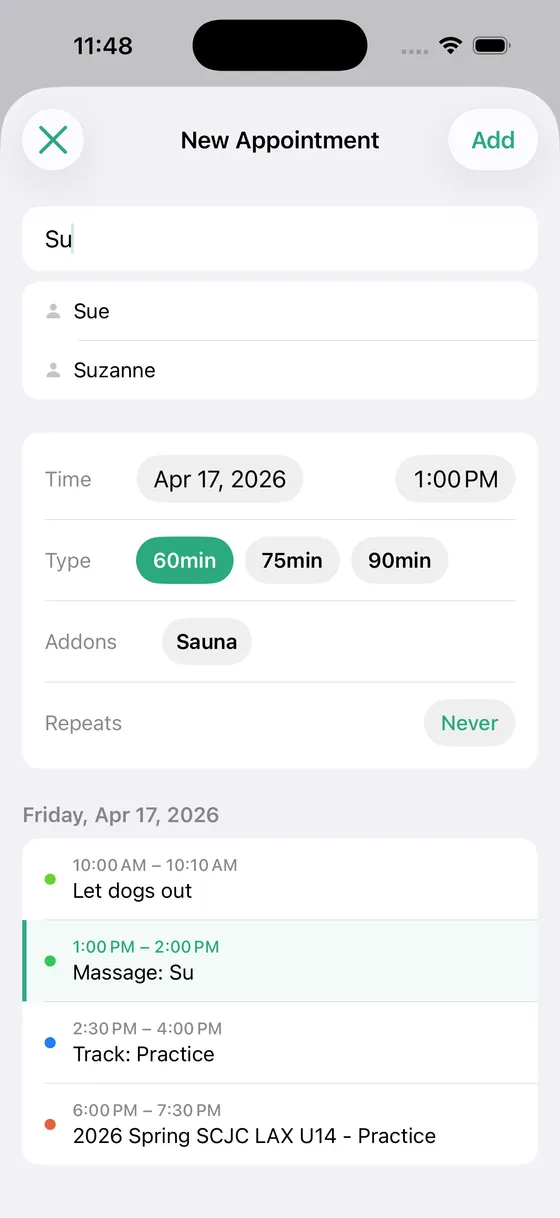
While you book, Solo shows the day's events from your other calendars underneath the form, so the dentist, the school pickup, and the soccer practice are right there when you are looking for an open slot. You choose which calendars are shown in Settings, and you can hide the ones that are only noise.
Sync that doesn't need babysitting
Solo refreshes in the background and keeps track of what it last saw in each calendar. Change an appointment in the Calendar app, move it from your Mac, or let someone on a shared calendar edit it, and Solo picks the change up on its next open.
A keyword for shared calendars
If your appointments share a calendar with other events, give Solo the keyword your appointment titles start with, such as “Massage” or “Cut”, and it treats only those as appointments. If the calendar holds nothing but appointments, leave the prefix off.
The details
- ✓ Any calendar account the iPhone Calendar app supports: iCloud, Google, Outlook, Exchange, CalDAV
- ✓ Appointments are standard calendar events, editable from any device
- ✓ Choose which of your other calendars are shown while booking
- ✓ Background refresh with per-calendar sync state
- ✓ Optional title prefix for calendars that mix appointments with other events
- ✓ No account to create and no server that holds your data
Who uses this
Solo is built for people who schedule their own clients.
Questions
- Does Solo Scheduling work with Google Calendar?
- Yes. Add your Google account in the iPhone's Settings so it appears in the Calendar app, and Solo can use any of its calendars for appointments. The same goes for Outlook, Exchange, and any CalDAV account.
- Do I have to give up the calendar I use today?
- No. Solo uses it. Pick it during setup and your existing appointments become your history and your client list.
- What happens if I edit an appointment in the Calendar app instead of Solo?
- Solo picks up the change on its next sync. Move the event and the appointment moves. Delete it and the appointment is gone.
- Does my calendar data go to your servers?
- No. Solo has no servers. Everything stays on your iPhone and in the calendar account you already trust.
Simple pricing
Start free. Upgrade when you're ready.
Free
Up to 3 clients
- ✓ Calendar sync
- ✓ Appointment scheduling
- ✓ Current year insights
Solo Pro
per month
- ✓ Unlimited clients
- ✓ Full historical insights
- ✓ Cash flow forecasting
- ✓ Revenue trends
Solo Pro
per year (2 months free)
- ✓ Everything in monthly
- ✓ Best value
Ready to simplify your schedule?
Download Solo Scheduling and get set up in under two minutes.
Download for iOS